
调用服务端 API
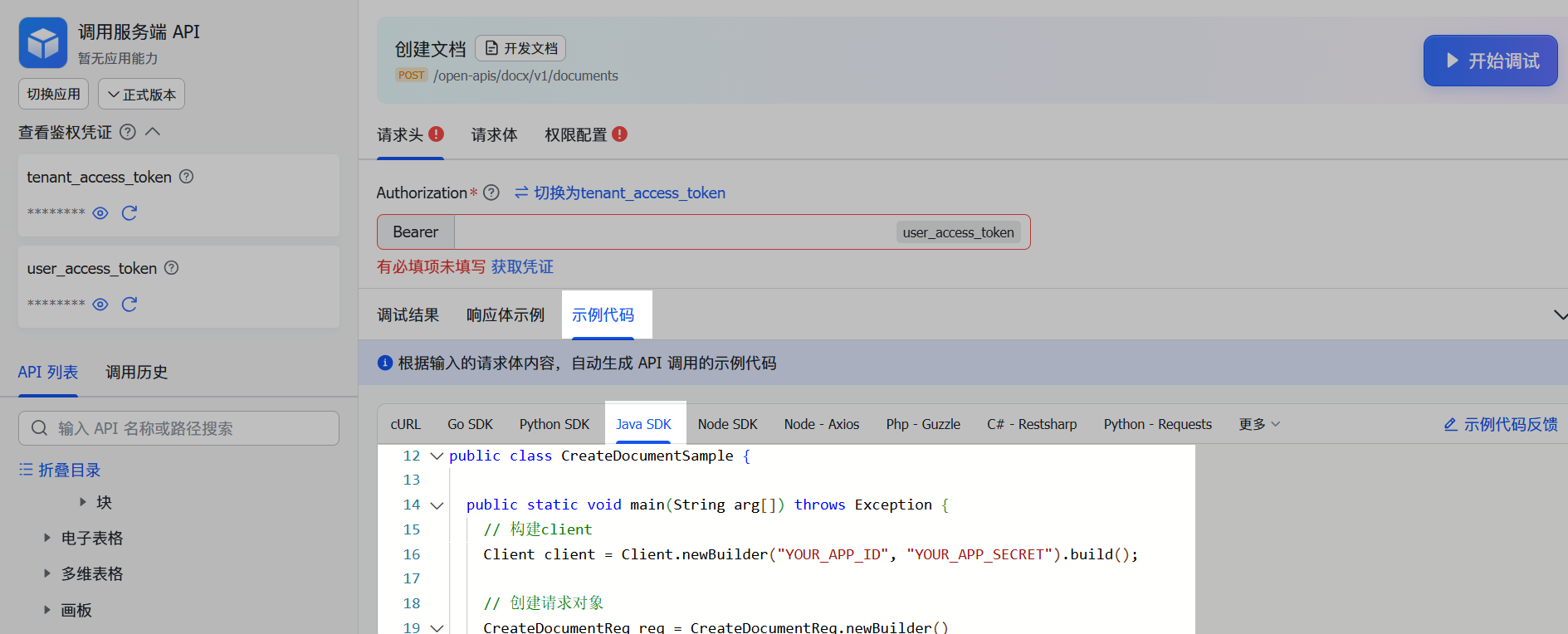
步骤一:构建 API Client
Client client=Client.newBuilder("appId","appSecret") // 默认配置为自建应用
    .marketplaceApp() // 设置应用类型为商店应用
    .openBaseUrl(BaseUrlEnum.FeiShu) // 设置域名,默认为飞书
    .helpDeskCredential("helpDeskId","helpDeskSecret") // 服务台应用才需要设置
    .requestTimeout(3,TimeUnit.SECONDS) // 设置httpclient 超时时间,默认永不超时
    .logReqAtDebug(true) // 在 debug 模式下会打印 http 请求和响应的 headers、body 等信息。
.build();| 配置选项 | 配置方式 | 是否必填 | 描述 |
|---|---|---|---|
| app_id 和 app_secret | Client.newBuilder("appId","appSecret") | 是 | 应用凭证 App ID 和 App Secret。可在开发者后台 > 应用详情页 > 凭证与基础信息 > 应用凭证 区域获取。 |
| appType | client.marketplaceApp() | 否 | 设置 App 类型为商店应用。如果你是 ISV 开发者,则必须设置该选项。关于商店应用的开发指南,可参见 ISV(商店应用)开发指南-oapi-sdk-java。 |
| logReqAtDebug | client.logReqAtDebug(boolean logReqAtDebug) | 否 | 设置是否开启 HTTP 请求参数和响应参数的日志打印开关。开启后,在 debug 模式下会打印 HTTP 请求和响应的 headers、body 等信息。在排查问题时开启该选项,有利于问题的排查。 |
| BaseUrl | client.openBaseUrl(BaseUrlEnum baseUrl) | 否 | 设置飞书域名,默认为 FeishuBaseUrl。可用域名如下:public enum BaseUrlEnum { FeiShu("https://open.feishu.cn"), LarkSuite("https://open.larksuite.com"), ;} |
| tokenCache | client.tokenCache(ICache cache) | 否 | 设置 Token 缓存器,用于缓存 Token 和 appTIcket,默认实现为内存。public interface ICache { // 获取缓存值 String get(String key); // 设置缓存值 void set(String key, String value, int expire, TimeUnit timeUnit);}对于商店应用的开发者而言,如果需要 SDK 来缓存 appTicket,则需要实现该接口,以提供分布式缓存。 |
| disableTokenCache | client.disableTokenCache() | 否 | 设置是否开启 TenantAccessToken (应用访问凭证)的自动获取与缓存。若配置该选项,表示关闭自动获取与缓存 TenantAccessToken;若不配置则为开启。 |
| helpDeskId、helpDeskToken | client.helpDeskCredential(String helpDeskId, String helpDeskToken) | 否 | 服务台的 ID 和 token。仅在调用服务台业务的 API 时需要配置。可在服务台管理后台设置中心 > API 凭证 处获取,详情参见 服务台接入指南。注意:服务台的 ID、Token 只有服务台创建者可以查看到。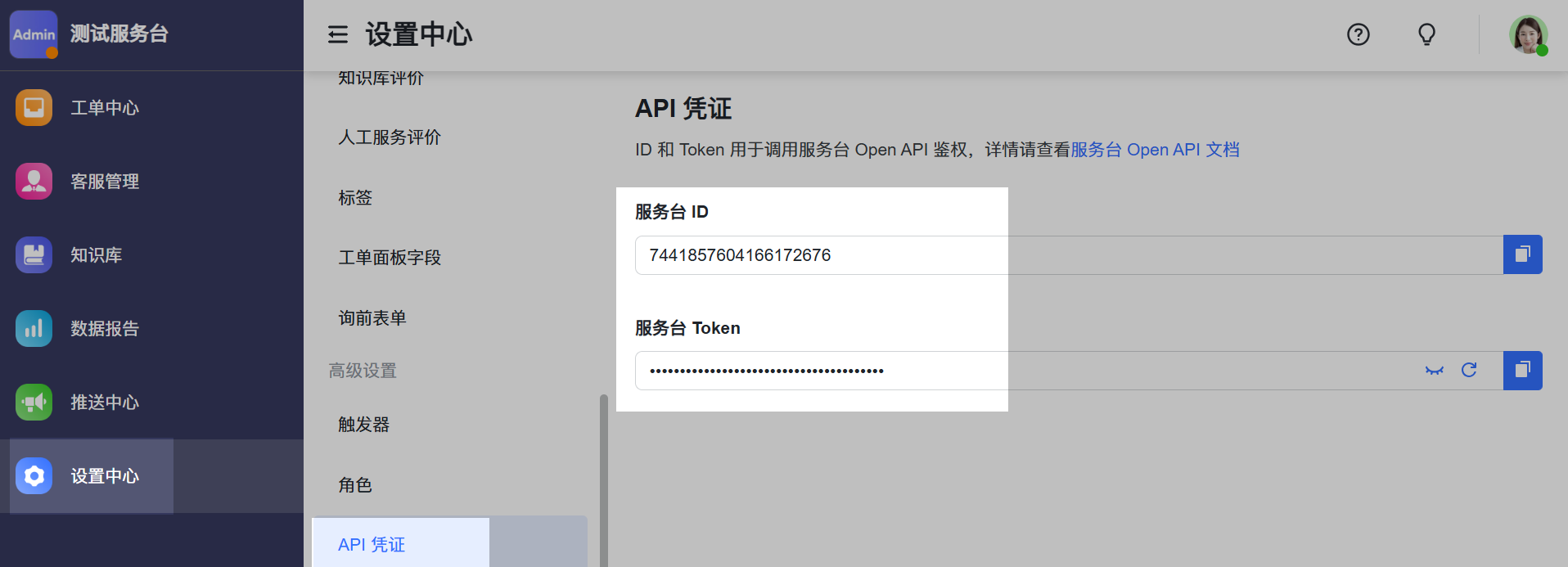 |
| requestTimeout | client.requestTimeout(long timeout, TimeUnit timeUnit) | 否 | 设置 SDK 内置的 Http Client 的请求超时时间。默认为 0 表示永不超时。 |
| httpTransport | client.httpTransport(IHttpTransport httpTransport) | 否 | 设置传输层实现,用于替换 SDK 提供的默认实现。你可通过实现下面的 IHttpTransport 接口来设置自定义的传输实现:public interface IHttpTransport { RawResponse execute(RawRequest request) throws Exception;}目前提供了以下两种实现:基于 OKhttp 的实现,使用方式参见示例代码。基于 Apache HttpClient 的实现,使用方式参见示例代码。 |
Client client=Client.newBuilder("appId","appSecret").build(); // 默认配置为自建应用marketplaceApp() 方法指定 AppType 为商店应用,代码配置如下。了解更多可参考 ISV(商店应用)开发指南-oapi-sdk-java。Client client = Client.newBuilder("appId", "appSecret")
.marketplaceApp() // 设置应用为商店应用
.build();步骤二:构造 API 请求

import com.lark.oapi.Client;
import com.lark.oapi.core.utils.Jsons;
import com.lark.oapi.service.docx.v1.model.CreateDocumentReq;
import com.lark.oapi.service.docx.v1.model.CreateDocumentReqBody;
import com.lark.oapi.service.docx.v1.model.CreateDocumentResp;
public class DocxSample {

  public static void main(String arg[]) throws Exception {
    // 构建client
    Client client = Client.newBuilder("appId", "appSecret").build();
    // 发起请求
    CreateDocumentResp resp = client.docx().document()
        .create(CreateDocumentReq.newBuilder()
            .createDocumentReqBody(CreateDocumentReqBody.newBuilder()
                .title("title")   // 文档标题
                .folderToken("")   // 文件夹 token,传空表示在根目录创建文档
                .build())
            .build()
        );
    // 处理服务端错误
    if (!resp.success()) {
      System.out.println(String.format("code:%s,msg:%s,reqId:%s"
          , resp.getCode(), resp.getMsg(), resp.getRequestId()));
      return;
    }
    // 业务数据处理
    System.out.println(Jsons.DEFAULT.toJson(resp.getData()));
  }
}(可选)步骤三:设置请求选项
| 配置选项 | 配置方式 | 描述 |
|---|---|---|
| headers | requestOptions.headers(Map<String, List<String>> headers) | 设置自定义请求头。在发起请求时,这些请求头会被透传到飞书开放平台服务端。 |
| userAccessToken | requestOptions.userAccessToken(String userAccessToken) | 设置用户 token,当你需要以用户身份发起 API 调用时,需要设置该选项的值。 |
| tenantAccessToken | requestOptions.tenantAccessToken(String tenantAccessToken) | 设置企业或组织 token,当你自己维护企业或组织 token 时(即创建 client 时 EnableTokenCache 设置为 false),需通过该选项传递企业或组织 token。 |
| tenantKey | requestOptions.tenantKey(tenantKey string) | 设置企业或组织 key, 当你开发商店应用时,必须设置该选项。 |
| requestId | requestOptions.requestId(requestId string) | 设置请求 ID,作为请求的唯一标识。该 ID 会被透传到飞书开放平台服务端。 |
import com.lark.oapi.Client;
import com.lark.oapi.core.request.RequestOptions;
import com.lark.oapi.core.utils.Jsons;
import com.lark.oapi.core.utils.Lists;
import com.lark.oapi.service.docx.v1.model.CreateDocumentReq;
import com.lark.oapi.service.docx.v1.model.CreateDocumentReqBody;
import com.lark.oapi.service.docx.v1.model.CreateDocumentResp;
import java.util.HashMap;
import java.util.List;
import java.util.Map;
public class DocxSample {
  public static void main(String arg[]) throws Exception {
    // 创建 API Client。你需在此传入你的应用的实际 App ID 和 App Secret
    Client client = Client.newBuilder("appId", "appSecret").build();
    // 设置自定义请求头
    Map<String, List<String>> headers = new HashMap<>();
    headers.put("key1", Lists.newArrayList("value1"));
    headers.put("key2", Lists.newArrayList("value2"));
    // 发起请求
    CreateDocumentResp resp = client.docx().document()
        .create(CreateDocumentReq.newBuilder()
                .createDocumentReqBody(CreateDocumentReqBody.newBuilder()
                    .title("title")   // 文档标题
                    .folderToken("")  // 文件夹 token,传空表示在根目录创建文档
                    .build())
                .build()
            , RequestOptions.newBuilder()
                .userAccessToken("u-2GxFH7ysh8E9lj9UJp8XAG0k0gh1h5KzM800khEw2G6e") // 传递用户token
                .headers(headers) // 传递自定义请求头
                .build());
    // 处理服务端错误
    if (!resp.success()) {
      System.out.println(String.format("code:%s,msg:%s,reqId:%s"
          , resp.getCode(), resp.getMsg(), resp.getRequestId()));
      return;
    }
    // 业务数据处理
    System.out.println(Jsons.DEFAULT.toJson(resp.getData()));
  }
}
步骤四:运行代码
{
  Document: {
    DocumentId: "IPI4dqnbfoPxL3xhAEhcjXabcef",
    RevisionId: 1,
    Title: "title"
  }
}
常见问题
如何调用历史版本 API ?
package com.lark.oapi.sample.rawapi;
import com.lark.oapi.Client;
import com.lark.oapi.core.enums.AppType;
import com.lark.oapi.core.response.RawResponse;
import com.lark.oapi.core.token.AccessTokenType;
import com.lark.oapi.core.utils.Jsons;
import java.util.HashMap;
import java.util.Map;
/**
 * 原生http 调用方式
 */
public class RawApiCall {
  public static void main(String arg[]) throws Exception {
    // 构建client
    Client client = Client.newBuilder("appId", "appSecret").build();
    // 构建http body
    Map<String, Object> body = new HashMap<>();
    body.put("receive_id", "ou_c245b0a7dff2725cfa2fb104f8b48b9d");
    body.put("content", MessageText.newBuilder()
        .atUser("ou_155184d1e73cbfb8973e5a9e698e74f2", "Tom")
        .text("test content")
        .build());
    body.put("msg_type", MsgTypeEnum.MSG_TYPE_TEXT);
    // 发起请求
    RawResponse resp = client.post(
        "https://open.feishu.cn/open-apis/im/v1/messages?receive_id_type=open_id"
        , body
        , AccessTokenType.Tenant);
    // 处理结果
    System.out.println(resp.getStatusCode());
    System.out.println(Jsons.DEFAULT.toJson(resp.getHeaders()));
    System.out.println(new String(resp.getBody()));
    System.out.println(resp.getRequestID());
  }
}如何快速获取接口对应的示例代码?
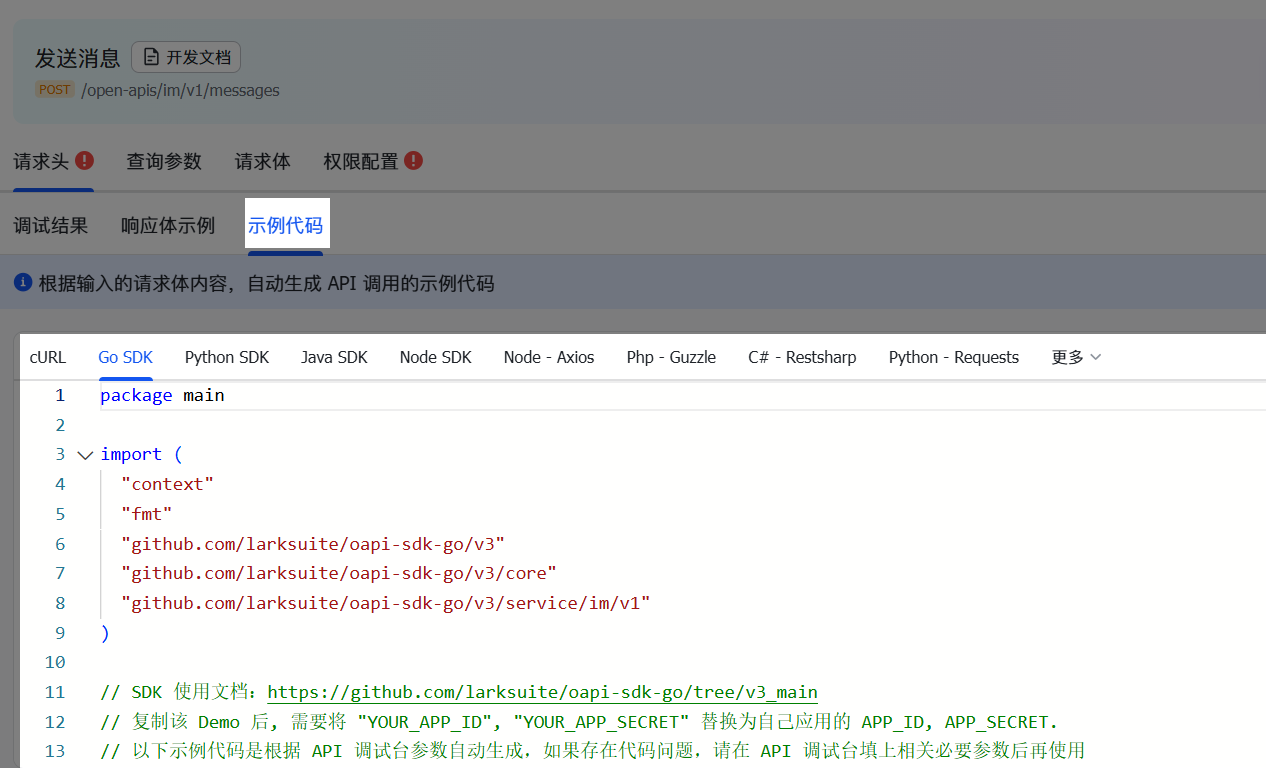
如何准确选择 API?

开放接口的 HTTP GET 请求需要携带请求体 Body 参数,如何传参?
Client.newBuilder(appId, appSecret)
      .httpTransport(
          ApacheHttpClientTransport.newBuilder().httpclient(HttpClients.createDefault()).build()
      )
接口超时并报错 ClientTimeoutException,如何解决?
@Test
void init() {
    Client client = Client.newBuilder("appId", "appSecret")
        .httpTransport(new OkHttpTransport(
            new OkHttpClient().newBuilder()
                .readTimeout(3, TimeUnit.MINUTES)  // 设置超时时间,单位必须为分钟
                .callTimeout(3, TimeUnit.MINUTES)  // 设置超时时间,单位必须为分钟
                .build()
        ))
        .tokenCache(LocalCache.getInstance())      // 默认实现,本地带时间过期的缓存;可以自己实现ICache的接口,例如Redis缓存等
        .logReqAtDebug(true)                       // 在 debug 模式下会打印 http 请求和响应的 headers,body 等信息。
        .build();
}
示例代码运行后,Client 正常发起请求并返回响应结果,但程序仍然一直运行了一段时间才自动停止是什么原因?
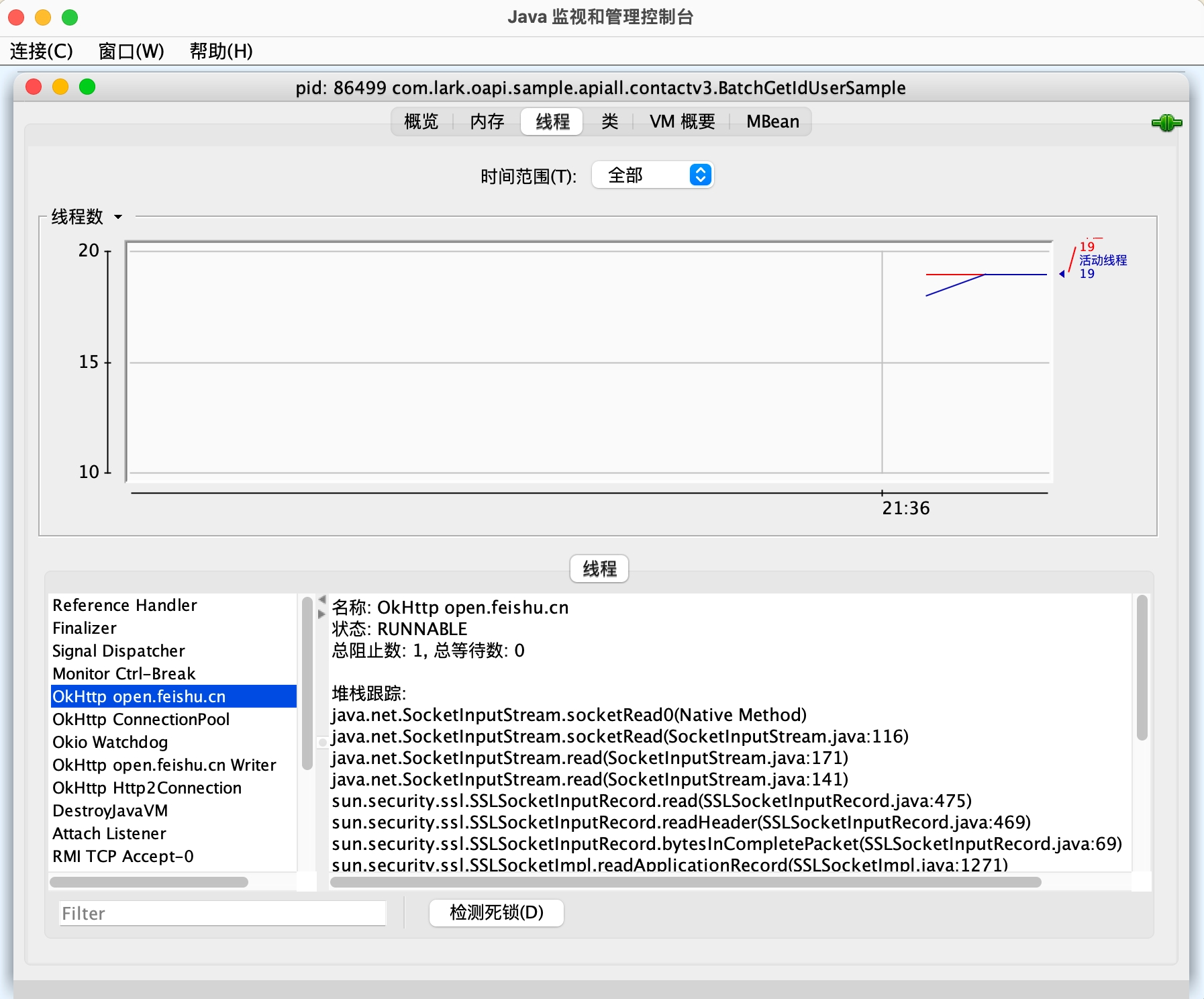
Connection: close 请求头来禁用 OkHttp 的连接复用能力,但该方式会导致网络性能下降,请谨慎操作。
修改于 2026-06-03 07:16:42